
Navigate Content
Infrastructure Enumeration: Mapping the Target
Before you can hack a target, you must understand it. Learn the principles of infrastructure enumeration, from DNS and cloud resources to OSINT and staff profiling.
The Art of Infrastructure Enumeration
In cybersecurity, whether you are performing a penetration test, engaging in red teaming, or hunting for bug bounties, the most critical phase is the one where you don’t exploit anything at all. This is Enumeration.
Enumeration is a continuous loop of gathering information, analyzing it, and using that new knowledge to gather even more information. It is the process of mapping the attack surface before you strike.
The Treasure Hunter Analogy:
Imagine you are a treasure hunter. You wouldn’t just walk into a jungle with a shovel and start digging random holes. You would waste time, cause a mess, and likely find nothing. Instead, you study old maps, research the terrain, talk to locals, and bring the right tools for the specific environment.
In cybersecurity, brute-forcing a login page immediately is “blind digging.” Enumeration is studying the map.
The Pentest Labyrinth and Methodology
Think of a target’s infrastructure as a massive labyrinth. Your goal isn’t just to smash through the first wall you see. Your goal is to walk the perimeter, find the gates, map the security cameras, and locate the ventilation shafts.
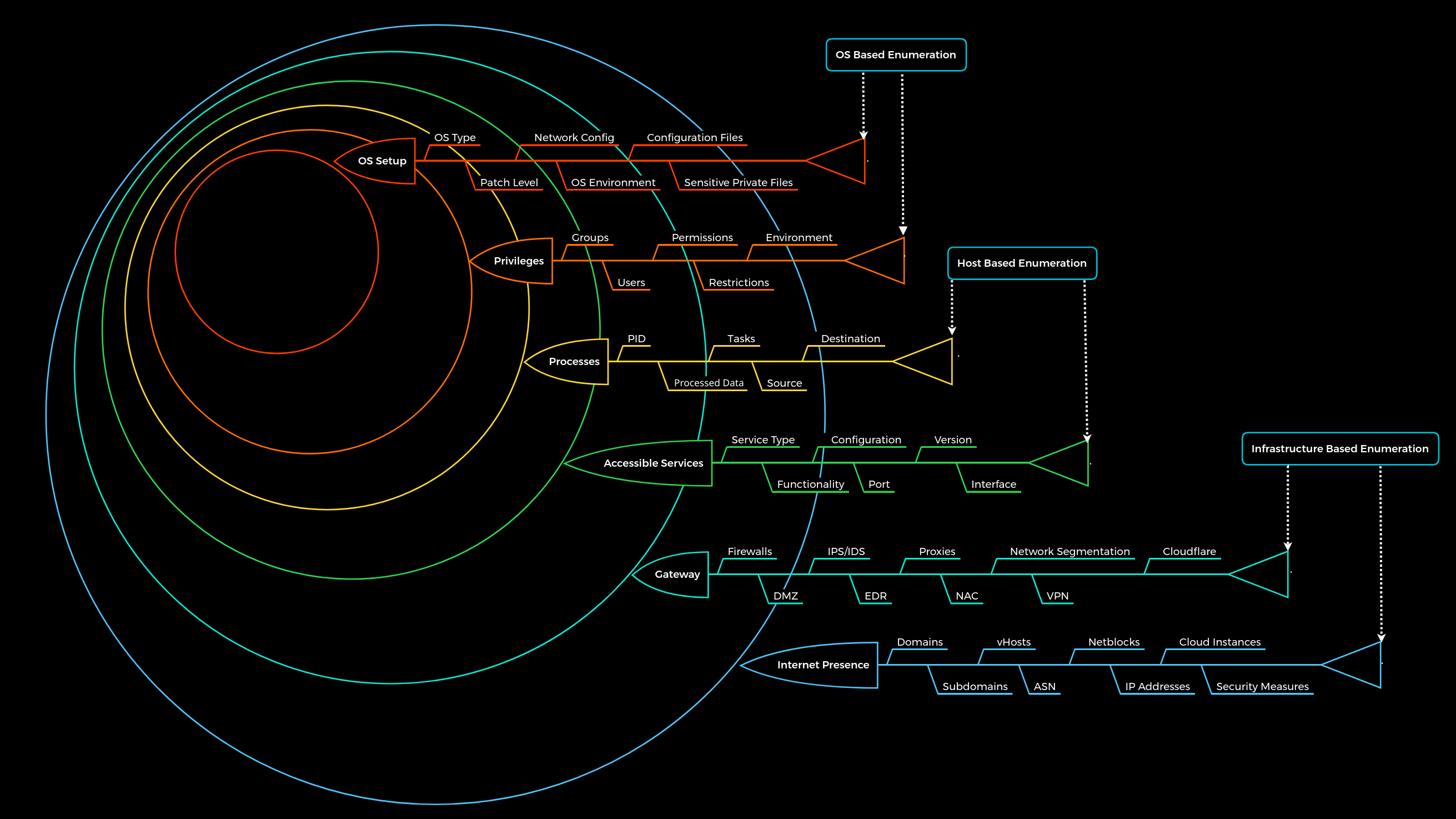
To navigate this labyrinth efficiently, we use a structured 6-Layer Methodology. For this guide, we are focusing entirely on Layer 1: Internet Presence.
| Layer | Name | Description | What We Look For |
|---|---|---|---|
| 1 | Internet Presence | The external footprint and OSINT. | Domains, Cloud, Employee info, Tech Stack. |
| 2 | Gateway | The perimeter defenses. | Firewalls, WAFs, VPNs. |
| 3 | Accessible Services | The exposed doors. | Web servers, Mail servers, databases. |
| 4 | Processes | Internal data flow. | How the services handle data. |
| 5 | Privileges | Identity and access. | User rights and misconfigurations. |
| 6 | OS Setup | The internal environment. | Patch levels, internal configs. |
Let’s dive into Layer 1 and explore how to map a target’s infrastructure.
1. Domain Information: The Digital Footprint
A company’s main website (www.target.com) is just the tip of the iceberg. Modern infrastructures are vast webs of subdomains, APIs, and third-party integrations.
Why We Do It
We want to find the assets the company forgot about. The main website is heavily guarded by security teams. The dev-api-v2.target.com subdomain, spun up by a stressed developer three years ago, is likely unprotected.
What Are We Searching For?
Staging/Development Environments: Often contain debug modes, verbose errors, or weak credentials.
Internal Portals: VPN logins, employee portals, or IT dashboards.
Third-Party SaaS: Proving they use Slack, Atlassian, or Office 365.
Technique A: SSL/TLS Certificates (Certificate Transparency)
Every time a company secures a web address with HTTPS, a public record of that certificate is created in a Certificate Transparency (CT) log. This prevents fake certificates from being issued, but it also gives hackers a public ledger of every subdomain a company has ever secured.
The Tool:
crt.shThe Approach: Searching
%.target.comon crt.sh will reveal certificates for things likematomo.target.com(analytics) orsmartfactory.target.com(IoT infrastructure).
Technique B: DNS Interrogation (The Phonebook)
The Domain Name System (DNS) is the internet’s phonebook, translating names to IP addresses. But it holds much more than that.
A Records: Maps a name to an IP. (Tells us exactly which server hosts the site).
MX Records (Mail Exchange): Tells us who handles their email. If it points to
google.com, they use G-Suite. If it points to their own IP, they host their own email server (a high-value target!).TXT Records (Text): This is the administrative “Junk Drawer.”
The Goldmine in TXT Records:
Administrators use TXT records to prove they own a domain to third-party services. By querying them, we map their corporate toolset:
# Using dig to query TXT records
dig target.com TXT +short
"v=spf1 include:_spf.google.com include:mailgun.org ip4:10.72.82.0/24 ~all"
"atlassian-domain-verification=IJdXMt1rKCy..."
What did we just learn?
They use Google for corporate email.
They use Mailgun for automated application emails (potential API webhook abuse).
They use Atlassian (Jira/Confluence) for project management.
They just handed us their internal/authorized IP address block (
10.72.82.0/24).
2. Cloud Resources, APIs, and Microservices
Modern applications rarely live on a single server. They are split into microservices, utilizing cloud storage (AWS, Azure, GCP) and communicating via APIs.
Why We Do It
Administrators often struggle with Cloud Identity and Access Management (IAM). It is incredibly easy to accidentally make a private data bucket public to the entire internet. Furthermore, APIs meant only for “machine-to-machine” communication are often left unauthenticated.
What Are We Searching For?
Misconfigured Storage: AWS S3 Buckets or Azure Blobs containing database backups, source code, or customer PII.
Exposed APIs: Endpoints like
/api/v1/usersthat lack rate-limiting or authentication.Leaked Keys: Hardcoded AWS access keys inside JavaScript files or public GitHub repositories.
Hunting for the Cloud (The Off-Site Storage Unit)
Companies usually follow naming conventions. If the company is “Inlane Freight”, their buckets might be named inlane-backup, inlane-dev-assets, or inlane-public.
We can use Google Dorking to find where these URLs are indexed:
site:s3.amazonaws.com intext:"inlanefreight"
Or, we can use specialized OSINT databases like GrayHatWarfare, which constantly scrape the internet for open buckets and allow us to search them by keyword.
If we find an open bucket, we might find a .env file containing the master database password. Game over.
3. Staff and OSINT: The Human Element
Servers don’t misconfigure themselves; humans do. Open-Source Intelligence (OSINT) involves gathering information about the people who build and maintain the infrastructure.
Why We Do It
If we understand the skills, habits, and tools of the IT and development teams, we can accurately predict the underlying technology stack of the company without ever sending a packet to their servers.
The Architect Analogy:
If you want to break into a bank vault, you could try drilling the steel. Or, you could find the architect who designed it, buy him a beer, and ask him what brand of hinges he prefers. OSINT is how we “talk to the architect” without them knowing.
What Are We Searching For?
Job Postings: The cheat sheet.
LinkedIn Profiles: Employee skill sets.
Public Code Repositories: Personal GitHub accounts of employees.
Decoding a Job Posting
Companies frequently post highly detailed job descriptions that read like a hacker’s target list.
Look at this excerpt from a hypothetical job listing:
Looking for a Senior Backend Engineer. Must have 5+ years experience with Python (Django). Will be responsible for migrating legacy Oracle databases to PostgreSQL. Experience with container orchestration via Kubernetes and CI/CD pipelines using Jenkins is required.
Without touching a single tool, we now know:
The web application framework is Django (We can start researching Django-specific misconfigurations, like exposed
SECRET_KEYs).The databases are Oracle and PostgreSQL.
They use Kubernetes (We should look for exposed Kubelet APIs).
They use Jenkins for automation (A prime target for remote code execution).
The “Overworked Employee” Scenario
Developers often take code home or back it up on their personal, public GitHub accounts. By searching for the company’s domain name or proprietary code snippets on GitHub, we frequently find:
Hardcoded API keys.
Internal network diagrams.
Private SSH keys accidentally pushed to a public repo.
Word Quiz
Correct := 0 | Wrong := 0
Question?
Fill the Answer
Correct:= 0 | Wrong:= 0
Question
Comments
comments powered by DisqusYou May Also Like

are used in search engine queries to find stuffs hiding deep under.
Automating Nmap Port Extraction for Faster Scanning
Using a custom ZSH function to bridge the gap between Nmap discovery scans and service enumeration by automatically copying open ports to the clipboard.
Read More